Your clients are yours. We never take a commission on them.
You send your link on WhatsApp and your client picks a service, a day and a time in three taps — no app to download, no account to create. You just accept. And you stop answering messages at midnight.


Genuinely free to start. No booking commissions, ever.
No booking commissions
Your clients download nothing
Clear price from the start
Cancel whenever you want
What you get free, and what Premium adds
No hidden caps on the free plan.
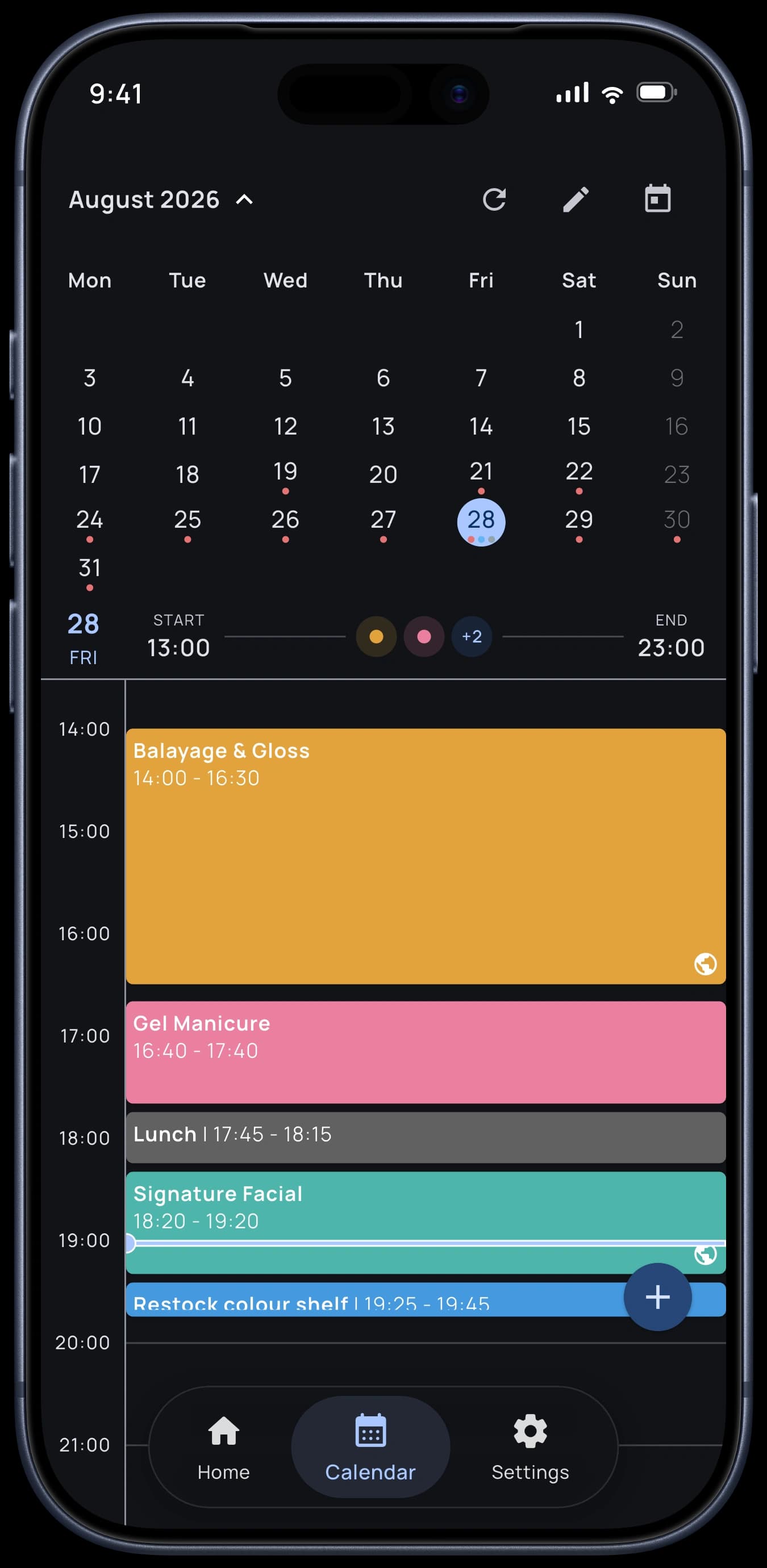
Calendar with the month at a glance and the day hour by hour
Unlimited clients, appointments and services — no hidden caps
Services with price, duration and colour
Client profiles with history and notes
Import your clients from your contacts or other apps
Supplies and expenses tracking
Revenue and client statistics
WhatsApp reminders in one tap — with no per-message fee
Tasks, breaks and working hours
Work addresses that fill into new appointments by themselves
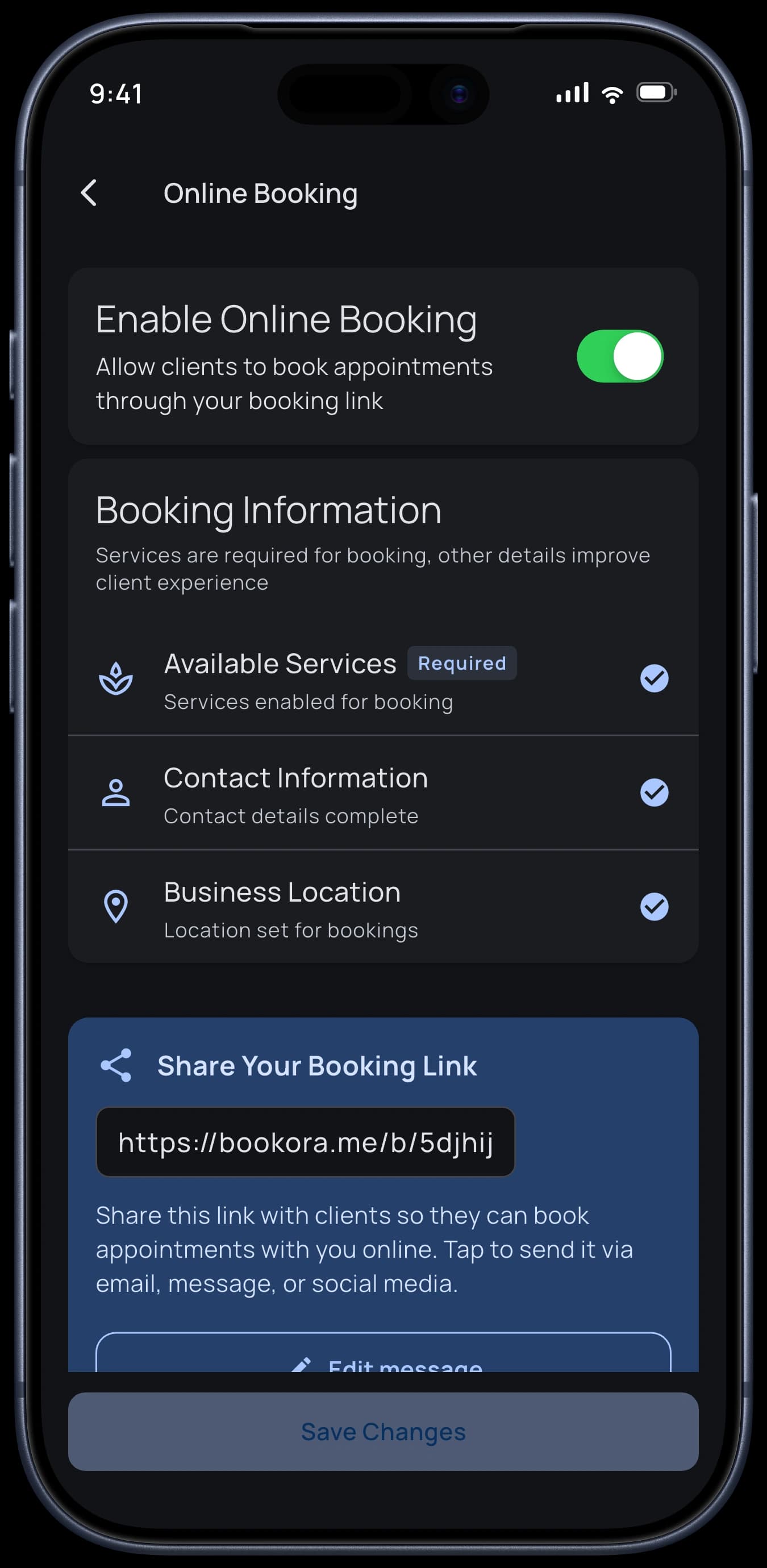
Your public 24/7 booking page
Automatic email and Telegram reminders
Google Calendar sync
Accounts for your team
Your clients book while you work
You send one link. Your client picks a service, a day and a time — with no app and no account.
What your client sees
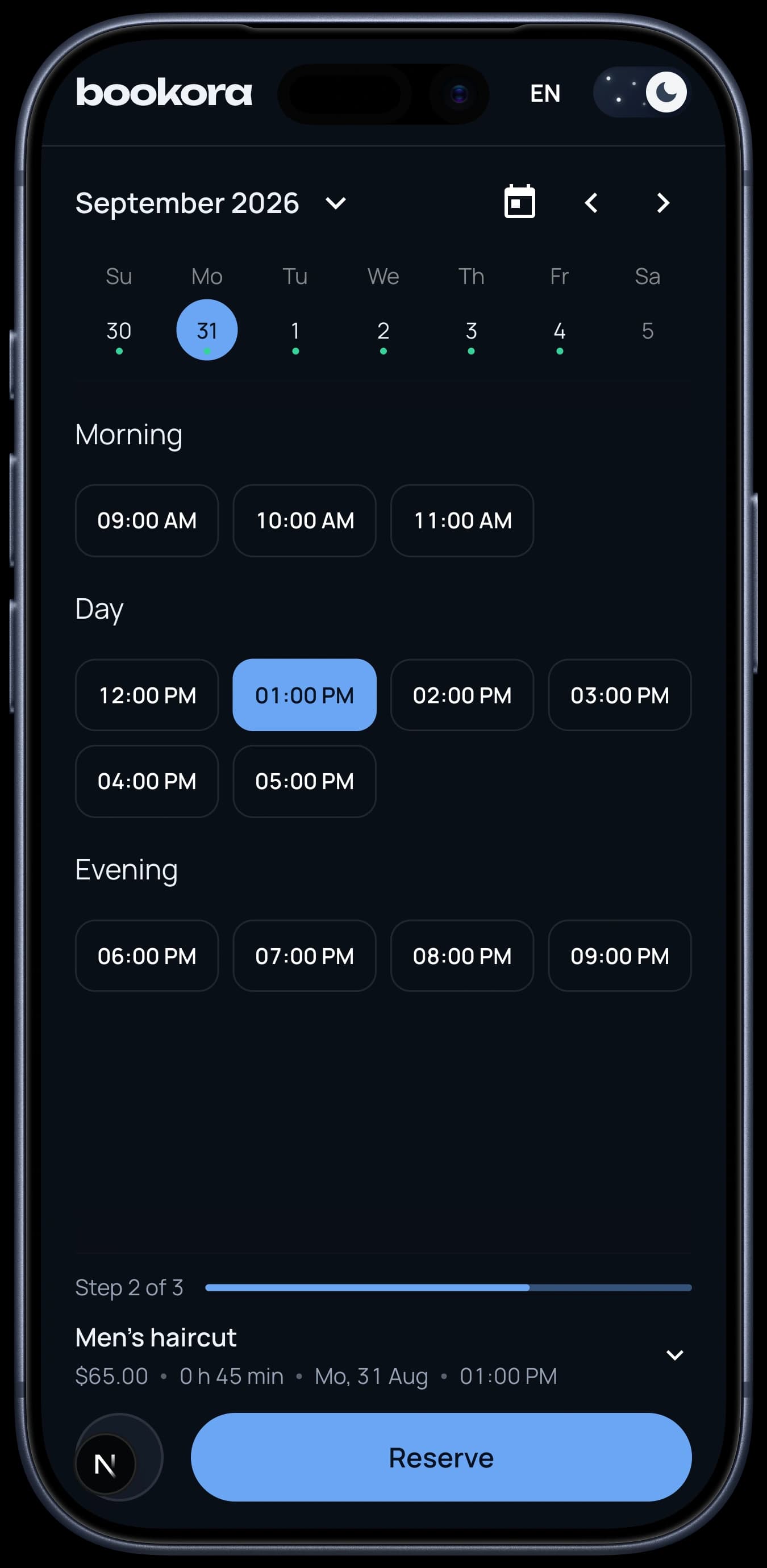
They open your link, see the times you actually have free, pick one and leave a name and phone. The request lands with you and you accept it. That's it.
Your real free slots, updated as your day changes
You decide which services can be booked online
Automatic email and Telegram reminders with Premium
They can cancel the appointment themselves, without messaging you
Two-way Google Calendar sync — your personal events take up time too
You set the rules. The page enforces them.
Your client only ever sees the times that work for you.
No dead gaps in your day
On days that already have appointments, Bookora offers your client the times right next to them. Your day packs tight instead of falling apart into unpaid hours between bookings. Want it left open? Switch to Flexible and any free slot can be taken.
How far ahead clients can book
You decide how much of your calendar is open for booking.
How much notice you need
Close off last-minute slots so nobody books a time you can't prepare for.
How the times are laid out
Slots follow each service's own length, or an even fixed grid — whatever suits your schedule.
Your cancellation policy
Add a link to your terms and your client sees them before they confirm.
Everything you need, nothing you don't
24/7 booking page
Your clients pick a service, a date and a time from your link. You just accept or decline.
A calendar that explains itself
The month at a glance, the day hour by hour. Appointments, tasks and breaks all on one timeline.
Client profile
History, phone, Instagram and your notes — with notifications on or off per client.
Supplies and expenses
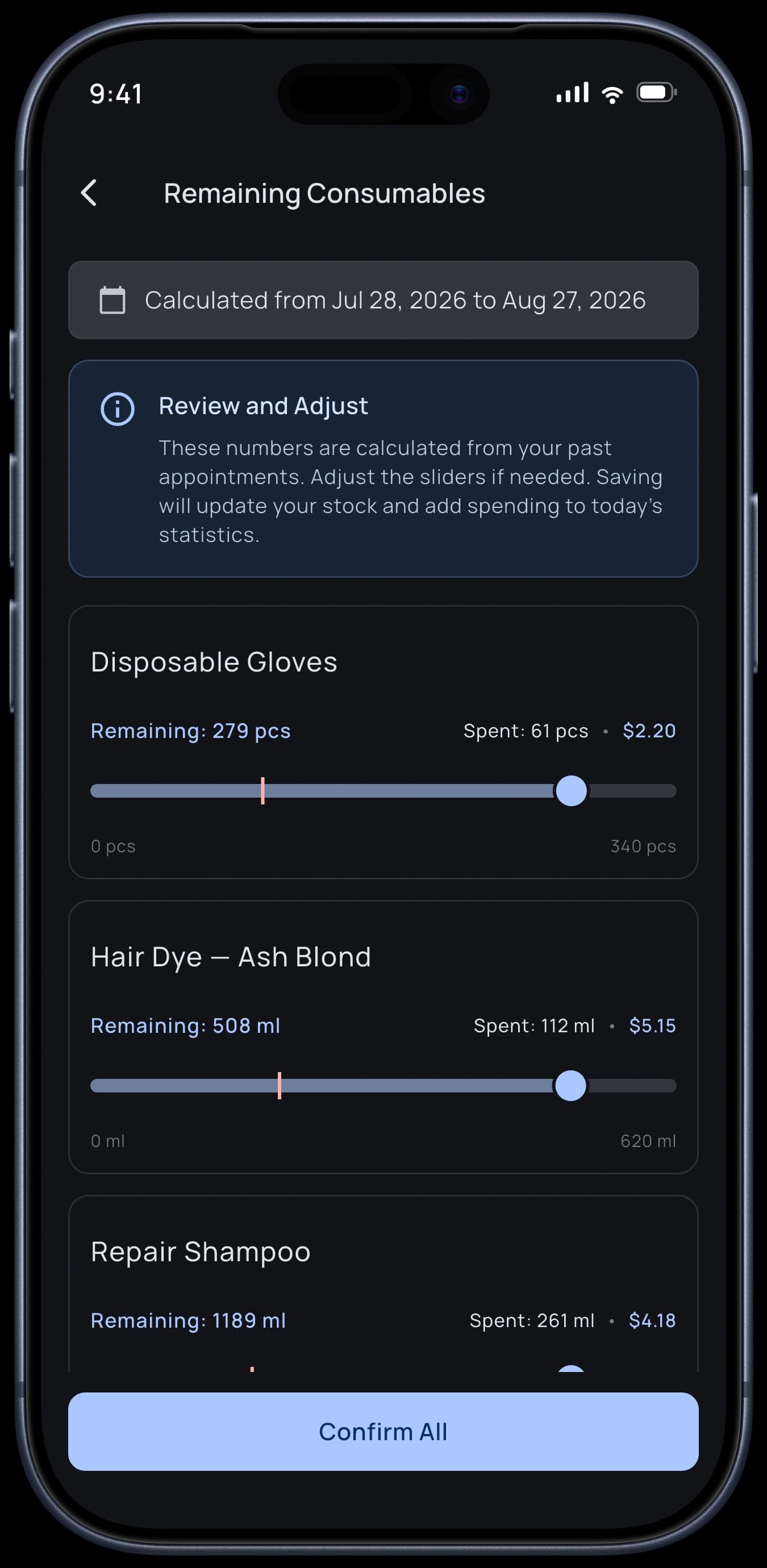
Log gel, acrylic and materials. Bookora estimates what your finished appointments used up — you adjust the numbers and confirm.
Your business numbers
Revenue, expenses, most requested services, clients who come back and how full your calendar is.
Google Calendar
Personal events from Google take up time in your Bookora day, and your appointments, tasks and breaks travel back the other way. One schedule instead of two.
The part nobody else counts
Supplies and money in the same place as your calendar.
Supplies that count themselves
Attach gel, tips or files to a service once. After your appointments, Bookora works out roughly how much went into them — you adjust the numbers and confirm.
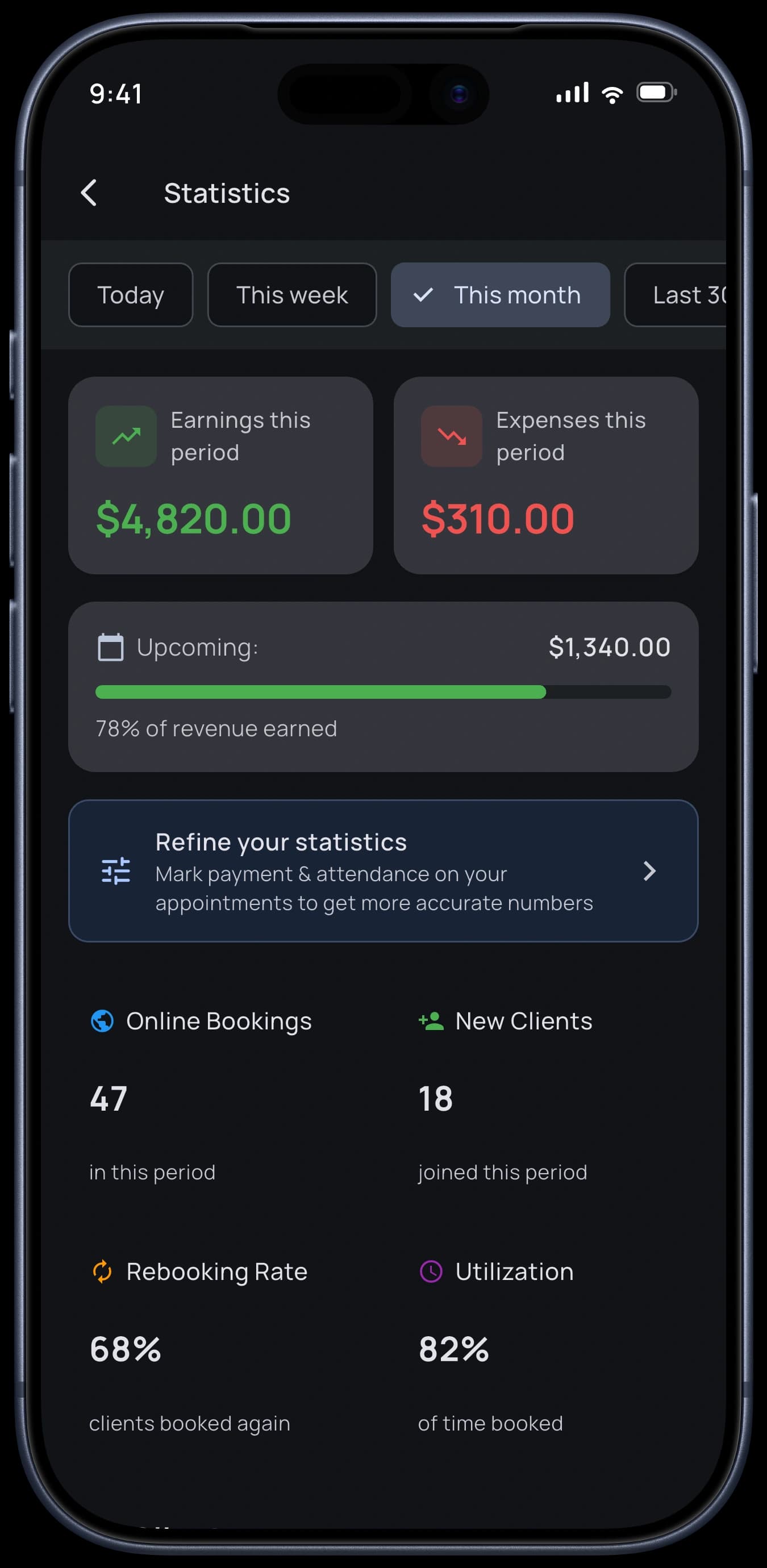
Numbers you can act on
Revenue and expenses side by side, which services get asked for most, how many clients come back, and how full your week really is.
Didn't come, didn't pay
Every appointment counts as attended and paid, so you only flag the exceptions. What stays in your revenue is what actually came in.
What is already booked
Earned so far and the expected income from appointments still to come, side by side.
Booked by them, entered by you
How many appointments arrived through your link, and how many you added by hand.
Not working on your own?
One subscription, one booking page, separate accounts. Everyone keeps their own calendar, clients, services and link.
Your client picks the specialist
Your booking page lists you and every active member. Your client chooses a specialist and carries on to that person's page — their services, their address, their free times. The appointment lands in that person's calendar.
Step into any account
Team accounts live side by side in the app. Switch into any of them and you see that person's calendar, appointments, clients and statistics.
Set it once, for everyone
Booking rules, reminder channels and message templates are the owner's to set. Change them and every member gets the new version.
A seat is one account. Free covers one, Individual covers two, and the Business plans in your store cover more. You, each active member and each invitation you have already sent hold a seat.
You can create the account yourself, or invite someone who already uses Bookora with a one-time code.
Experience Bookora on iPhone and Android
Discover our beautiful, intuitive interface designed to streamline your beauty business
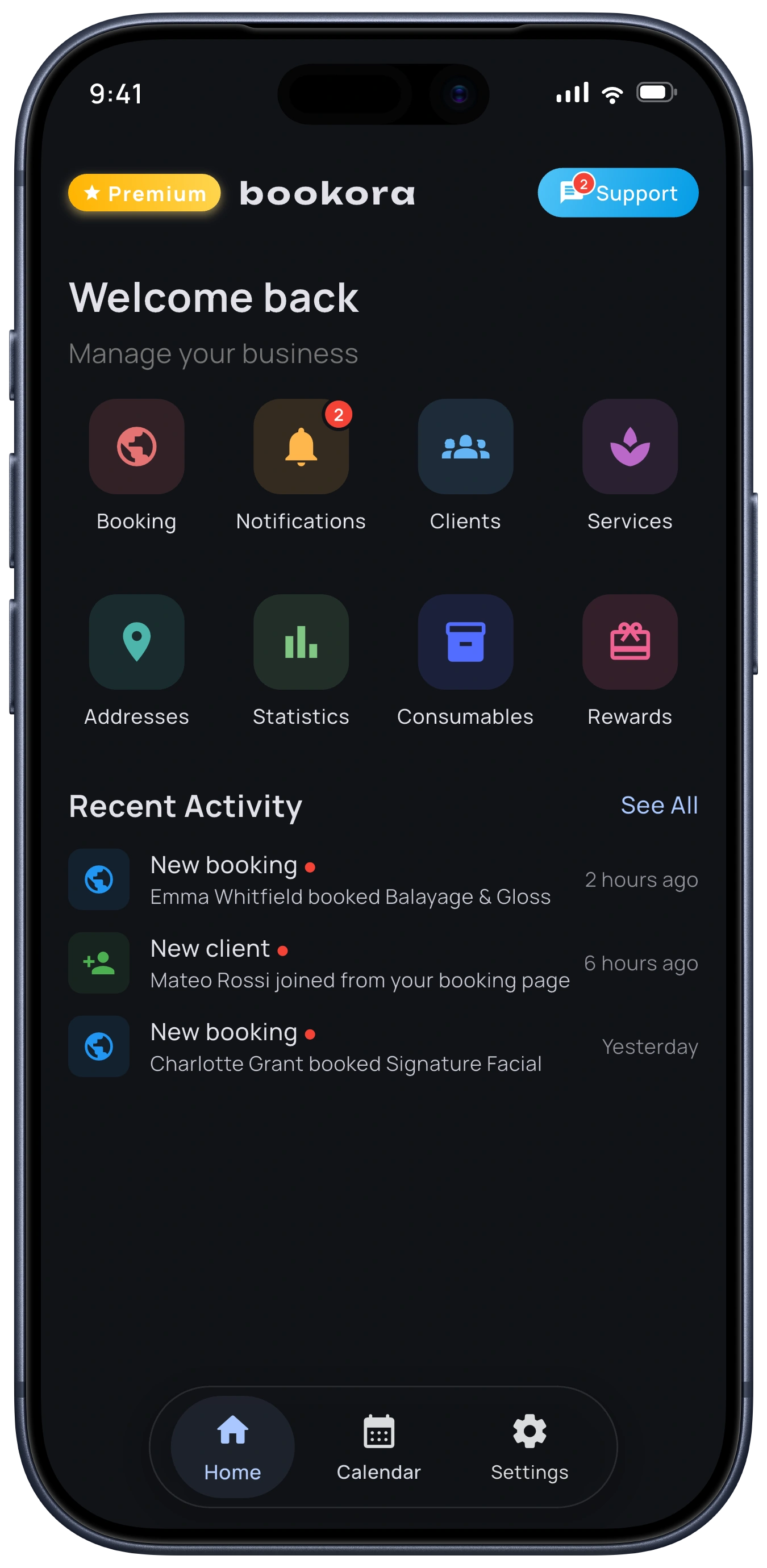
Smart Dashboard
Get a complete overview of your day with upcoming appointments, client information, and business metrics all in one place. The smart dashboard helps you stay organized and never miss an appointment.
Getting started takes ten minutes
Download the app
Bookora is on the App Store and Google Play
Add your services
Price, duration and the colour you want to see
Share your link
Put it in your Instagram bio or send it on WhatsApp
Accept your bookings
Requests land in your calendar and you confirm them
In your language, in your currency
And in your client's timezone.
The app speaks your language
Switch it right in the settings — the whole app follows along.
Your currency, your formats
Over fifty currencies, 12- or 24-hour time, the date order you write in, and the day your week starts on.
Their timezone, not yours
A client booking from another country sees your free times on their own clock, while you see the appointment on yours. Same moment, no arithmetic.
Choose Your Perfect Plan
Unlock the full potential of your beauty business with our flexible pricing options
Cancel whenever you want from your App Store or Google Play
per month
Billed monthly
Your public booking page, open around the clock
Automatic email and Telegram reminders
Two-way Google Calendar sync
Accounts for your team: two on Individual, more on Business
No booking commissions
per month
Billed every 3 months · $23.99
Save $5.98 (20%)
Your public booking page, open around the clock
Automatic email and Telegram reminders
Two-way Google Calendar sync
Accounts for your team: two on Individual, more on Business
No booking commissions
per month
Billed annually · $59.99
Save $59.89 (50%)
Your public booking page, open around the clock
Automatic email and Telegram reminders
Two-way Google Calendar sync
Accounts for your team: two on Individual, more on Business
No booking commissions
A free trial is offered when your store account is eligible for one. Cancel whenever you want from your App Store or Google Play.
Questions about plans for a bigger team? Contact us
Questions people ask
On the free plan, Bookora writes the message and opens WhatsApp with the text and the number already filled in — you just hit send, and you never pay per message. With Premium, email and Telegram reminders go out on their own when you create, change or cancel an appointment.
Yes. From your phone contacts or from other apps you used before. You can also add them by hand.
No. You pay your subscription and nothing else. Bookora takes no commission on your bookings or on what you charge.
Your calendar, your clients and your history stay where they are. The booking page, the automatic reminders and the Google Calendar sync switch off. You turn them back on when you renew.
From your App Store or Google Play, in the subscriptions section. You keep Premium until the period you already paid for ends.
Yes. It is encrypted in transit and backed up in the cloud, so you can change phones and your calendar is still there.
Your calendar, ready in ten minutes
Start free today. Cancel whenever you want.